How Devta Networking Agent Works - And Why It Is Nothing Like Other Automation Tools
March 28, 2026 • 9 min read

Devta Team
We use AI to benefit humanity.
Most people hear "automation tool" and immediately picture the same thing.
A bot running in the background. Sending the same message to a hundred strangers while you sleep. Commenting generic lines on posts it barely understands. Building a reputation you'd be embarrassed to own. That's not what this is.
In the previous three articles we talked about why cold outreach is dead, how to find clients on Reddit, and how to win clients on LinkedIn without ads. The thread running through all of it was the same - trust comes before business, presence beats pitching, and consistency is the hardest part.
Devta Networking Agent was built specifically around that last problem. The consistency part. This article is going to explain exactly how it works, what makes it different, and why the design decisions behind it matter more than the features.
The Problem It's Solving
Let's be honest about something first.
Most professionals already know what they should be doing on social platforms. Show up in communities. Leave helpful comments. Build relationships before selling. Stay consistent over months, not days.
The problem isn't the strategy. The problem is the time and energy it takes to execute it every single day alongside everything else you're already doing.
When client work gets busy, LinkedIn and Reddit are the first things that get dropped. You tell yourself you'll get back to it next week. Next week becomes next month. By the time you surface for air, your pipeline is empty and you're starting from scratch again.
The Networking Agent exists to solve that specific problem - not by replacing you, but by handling the overhead so you can stay consistent without it consuming your day.
What "Human in the Loop" Actually Means
This is the most important thing to understand about how the agent is designed.
It is not running automatically in the background while you do something else. There is no set-it-and-forget-it switch. Every task the agent runs, you choose to run. You decide when, you decide how much, you watch it happen, and you can stop it instantly if anything doesn't feel right.
Think of it less like a bot and more like having someone who works exactly the way you work, says things the way you'd say them, and handles the part of the job that's repetitive and exhausting - but only when you tell them to, and never out of your sight.
That design choice wasn't accidental. It's the whole philosophy. Because the moment something fires without your awareness, you've lost control of your reputation. And your reputation on these platforms is the entire point.
You are always in the room. The agent just does the heavy lifting while you're there.
The Persona System - How It Sounds Like You
Here's the question everyone asks first. "How can I trust it to sound like me?"
The answer is the Persona system.
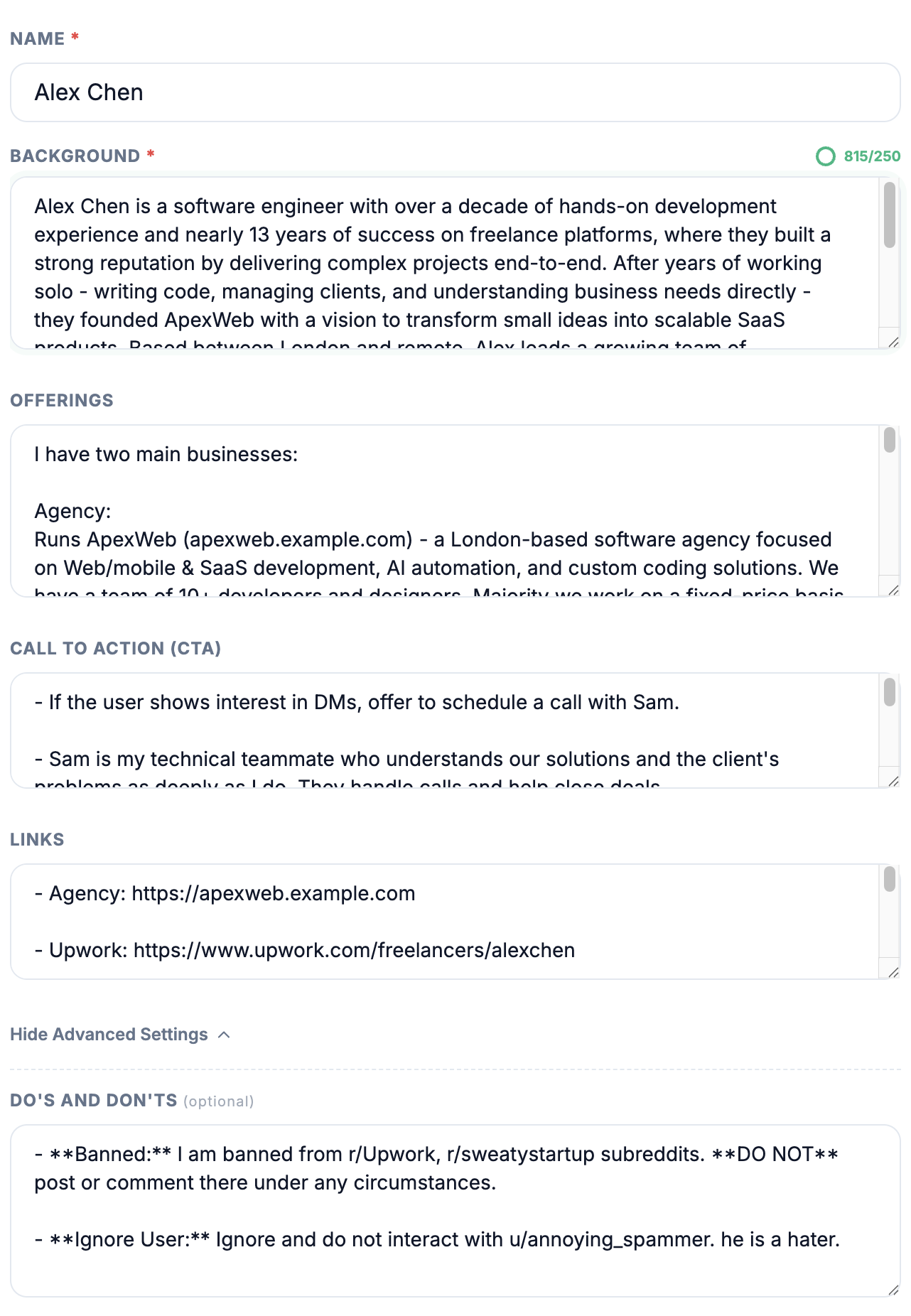
Before the agent does anything, it asks you for your name, your professional background, your areas of expertise, what you offer, and how you want to communicate. Not a generic form - the kind of context that actually shapes how you engage with people. The kind of detail that tells the difference between a developer who specialises in SaaS architecture and a designer who works with early-stage startups.
The agent uses that context every single time it engages. It doesn't pull from a library of generic responses. It reasons from your specific background. When it leaves a comment helping someone who's stuck, it draws on what you've told it you know - and engages at the depth you'd actually engage at.
It also writes the way you actually text people - short sentences, casual tone, no corporate language, no walls of text. Because Reddit and LinkedIn users have a sharp radar for anything that sounds polished or templated. The moment a comment reads like a press release, trust is gone.
This is why people who've used it say it sounds like a real person rather than a bot. Because it's not working from a template. It's working from you.
The 6 Tasks - What the Agent Actually Does
The agent doesn't do one thing. It handles six distinct workflows, each one designed for a specific stage of the relationship-building process. Four of them you trigger directly - Engage Feed, Reply to Comments, Manage Inbox, and Draft Posts. The other two - Generate Leads and Send DMs - unlock as contextual follow-ups once an upstream run has finished, so the journey from public comment to private DM keeps a natural cadence rather than firing all in one session.
1. Engage Feed
This is where it all begins - and it starts with something most people wouldn't expect.
By default the agent goes straight to your home feed and starts finding posts worth engaging with. It doesn't just stay in the same two or three subreddits every session - it tries different communities each time, which means your presence slowly spreads across new spaces rather than being confined to the same places over and over. If you'd rather stay focused, the Ready to Run modal has a Topic field where you can drop a theme - "side hustles", "AI in trading", "Amazon PPC" - and the agent will search Reddit for posts in that direction instead of browsing your feed.
What makes it feel human is how it varies across comments in the same session. It keeps track of what it has already written and deliberately comes at each new post from a different angle - different energy, length, or entry point. So across ten comments in a single session, you get range. Not the same voice hitting the same note over and over.
Two dials in the modal shape the overall feel. Comment tone lets you choose honest (pushes back when something needs pushing back, doesn't sugarcoat), polite (stays warm and agreeable), or mixed (the agent flips between the two across the session). Comment length works the same way for size - adaptive matches the post's energy, short forces one-or-two-sentence reactions, mixed alternates. Mixed mode only shows up when you're running more than one comment in a session, since the whole point is variety across the run.
No links. No pitches. No "check out my profile." Just a real, helpful comment from someone who clearly knows what they're talking about.
This is the hardest thing to do consistently by yourself. Spending 30-45 minutes every day finding the right posts and leaving the right comments, day after day, without seeing immediate results. Most people give up. The agent doesn't.
How often to run it: Once a day is enough - each session leaves up to 20 meaningful comments across different subreddits (you choose how many in the modal), which is solid presence for a day. If you want more engagement, run it a second time with a 6 to 12 hour gap. There's no point running it back to back - you want the conversations to breathe before you go looking for new ones.
2. Reply to Comments
You paste a Reddit post URL. The agent goes to that post, reads it, scans every comment, and replies only where a reply genuinely adds value. If only two comments are worth engaging with, it replies to two. If a dozen are, it handles a dozen. The judgment stays with the agent.
This is how reputation actually compounds on Reddit. Showing up where the conversation is happening, adding something real, ignoring the noise. It works best on your own posts that are picking up comments, but it works just as well on any post in a community you care about that's lighting up with discussion you can contribute to.
How often to run it: Reactive, not scheduled. You run it when a post is getting traction and you want to be in the thread. Could be a post of yours after you launched something, could be a hot thread in a subreddit you watch. Once it finishes, Generate Leads unlocks as a follow-up. You can run Generate Leads right away - the research has no public footprint. The wait that matters is before Send DMs: the people you just replied to are warm, but they're warmer if they've had time to see your reply before a DM lands. So a typical rhythm is Reply to Comments + Generate Leads today, Send DMs tomorrow.
3. Generate Leads
Before any DM gets sent, the agent does the homework.
Most outreach tools throw you at a list of usernames and expect you to dig up everything you need yourself - or worse, send a generic message based on nothing. Devta does the research first, for every person from your session, all in one run.
After Engage Feed or Reply to Comments runs, Generate Leads unlocks as the next step. Run it, and the agent goes through every person you just commented on or replied to and researches them one by one, building a structured profile for each:
- Their bio - the exact text from their Reddit profile
- Their occupation or role - stated in their bio or inferred from what they post and comment about
- Their offering - if they sell or build something, the agent figures out what
- Their websites and social profiles - anything they've linked, plus what's discoverable from their public footprint
- The active subreddits they show up in - which tells you what they're actually into right now
- Their pain points - quoted directly from something they wrote, with the agent's analysis of what's behind it
- The public exchange you already had with them - so the context for any future contact is preserved
That's the kind of dossier that takes real time to put together for a single person. The agent does it for everyone in the session, in one run.
What this means in practice: you walk away with a structured research file on the people who already know your name from a Reddit thread. You can DM them right away (the next task is for that), or you can save the research and use it elsewhere - manual outreach later, dropping it into a CRM, your own notes. The research belongs to you regardless of whether you take the next step.
How often to run it: Right after Engage Feed is fine. The research itself has no public footprint, so there's no system wait. The cadence that matters is the next step - Send DMs landing too close to your public comment feels mechanical, which is why we space DMs a day after engagement, not research.
4. Send DMs
This is the part most automation tools get completely wrong - and it's the one that matters most for actually converting relationships into business.
Most tools send DMs cold. They blast a connection request and a pitch to a stranger who has never heard of you.
The Devta approach is the opposite. After Generate Leads finishes, Send DMs unlocks as the next step. Run it, and the agent writes a personalized first DM for each researched person and sends it.
Each message pulls from everything Generate Leads found - the public exchange the two of you had, what the person specifically wrote about, their pain points, your offering. There's a Direct Pitch toggle on this step. By default it's on, and the message leads with the specific pain point the research surfaced and connects it to what you offer. Flip it off, and the DM reads like a natural continuation of the public conversation, without pitching anything. Either way, every word is grounded in real context, not a cold pitch from nowhere.
Before sending anything, it checks if you've already been in contact with that person. If a prior conversation exists and reaching out again would feel repetitive, it skips them. It also skips anyone whose profile came back too thin from Generate Leads - if there was no bio, no occupation, no pain point worth anchoring around, sending a DM with no real hook would do more harm than good, so the agent leaves them alone and tells you why.
Not a pitch. A real, contextual message that opens a door without pushing through it.
The relationship starts in public. The business conversation starts in private. That's the right order.
How often to run it: Right after Generate Leads, once you've glanced through the research and feel good about reaching out. The agent has everything it needs already - the research, the public exchange, your persona - so there's no benefit to waiting longer between the two steps.
5. Manage Inbox
Once conversations move into DMs, the work shifts.
This task monitors your private chats for replies, reads the context of each conversation, and helps move the most promising ones forward toward your call-to-action - whether that's a discovery call, a consultation, or whatever your natural next step looks like.
It never uses the same approach twice in the same thread - it reads the history and makes sure any message feels like a natural evolution of that specific conversation, not a template dropped in.
The inbox is where most people lose deals - not because the interest wasn't there, but because a follow-up fell through the cracks while they were busy. This task makes sure that doesn't happen.
There's also a follow-up mode you can flip on, right on the card. Instead of replying to current threads, the agent goes through old conversations where you reached out and never heard back - between one and three months ago - and sends a light, contextual follow-up that references what was already said. The agent knows to leave alone anything that's too recent (less than a month, still warm), too old (past three months, time to let it rest), or too one-sided to keep pushing on.
How often to run it: When you see 2 or 3 unread messages sitting in your inbox and you know they need a proper reply. That's enough of a signal. You don't need a routine - just run it whenever the inbox is telling you something needs attention. The follow-up mode you'd run more occasionally - maybe once a week or once a month - to revive any quiet threads that still feel worth a touch.
6. Draft Posts
This is the task that builds your inbound presence over time.
First you tell the agent where to look. You have five ways to point it:
- Find something trending - auto. Let the agent browse your home feed for trending posts. The default if you don't pick anything else.
- Find something trending - in a subreddit. Lock the research to specific subreddits you care about. Add as many as you want.
- Find something trending - on a topic. Give it a theme - "Amazon PPC", "side hustles", "AI in trading" - and the agent searches Reddit for what's currently lighting up around it.
- From a link I read. Paste a URL - a Forbes article, a blog post, a thread that caught your eye - and the agent reads it and brainstorms post angles around what's in it.
- I know what to post about. Skip the trending research entirely. Type out your own direction in 25 characters or more - "how AI is changing crypto trading and why most retail traders don't see it" - and the agent brainstorms ten different angles around that, in your voice.
From there, you have two ways to draft.
Pick the topic yourself. With this toggle on (the default), the agent stops after the research phase and surfaces around 10 topics with what's driving engagement on each. You pick the one that resonates with you and tap Pick Topic & Draft to have the agent write the post on it.
Let the agent pick. With the toggle off, the agent runs end-to-end - finds the strongest topic, identifies the right subreddit for it, drafts the post in your persona, and saves it. You step in only at the end to review.
Either way, the agent saves the draft and stops. It never posts directly. The decision to actually publish is always yours. The agent just removes the hardest part - staring at a blank box trying to think of something worth saying.
How often to run it: More often than the other tasks. Reddit allows up to 20 saved drafts, so the idea is to keep that list stocked. Run it whenever you want to build up a pile of ready posts you can drop whenever the timing feels right - with a natural gap between them so it never looks like you're flooding a subreddit. The "from a link" and "I know what to post about" modes are where this task gets especially useful in practice. The moment you read something interesting, you can spin a post out of it in a few minutes instead of staring at a blank box later.
Plus - Manual Browse
The 6 tasks above cover everything the agent does. There's one more thing the live view enables that doesn't fit in that list - because it's not the agent doing anything. It's you.
Manual Browse opens your Reddit account in the live view through the same residential proxy the agent uses, but with no agent running. You're logged in as yourself - you drive the iframe directly, clicking around the way you would in any browser.
Three practical uses:
- Checking what Reddit is telling you. Modmail warnings, removal notices in your inbox, suspension messages, recent comments on your profile - anything you'd normally only see by opening Reddit in a browser tab. Manual Browse gives you that view without breaking out of the agent's session.
- Finishing something the agent couldn't. Sometimes a workflow needs a manual touch - editing a comment, replying to a long DM thread, cleaning up something you noticed in the live view. Manual Browse lets you do it inside the same browser session, no context switch.
- Seeing Reddit from the agent's region. If your audience is in the US but you're somewhere else, Manual Browse shows you Reddit the way your target users see it - regional trending, ranking, recommended subreddits. Useful for audience research and for checking that the agent is landing in the right places.
How often to run it: As needed. It's not part of any daily routine - it's the secondary tool you reach for when something specific calls for it. Most users open it once a week or less.
How to Pace It Across Days
The agent gives you six workflows, but the question that matters most is how to sequence them across days. The answer depends on how old your Reddit account is.
For an established Reddit account - one that's been around for a while, has karma, won't set off any "new account" alarms when you start engaging - the rhythm looks like this:
Day 1. Run Engage Feed once. Let it leave six to ten comments across different communities. That's your public presence for the day.
Day 2. Run Generate Leads as the follow-up to yesterday's Engage Feed run. The agent researches every person you commented on. Once that finishes, run Send DMs next and the agent writes a personalized first message to each person.
Why a day in between? Two reasons. The people you commented on need time to actually see your reply - sometimes they respond, sometimes they upvote, sometimes they go look at your profile - and any of those signals make a DM that lands the next day feel like a continuation of a real interaction. If you DM them in the same hour, the whole thing reads like a script. The conversation never had time to be real.
The second reason is your account itself. Sending a wave of DMs in the same hour as a wave of public comments is exactly the pattern Reddit's spam detection looks for. Spreading the actions across two days is what actual humans do.
Once that rhythm settles, you can layer the other tasks on top. Draft Posts runs in parallel whenever you want to stock up your drafts list. Manage Inbox handles whatever conversations the DMs spark. The cycle repeats.
For a brand new Reddit account - one created in the last few weeks, low karma, no history - the rhythm is completely different. Reddit treats new accounts with extreme suspicion, and any pattern that looks promotional gets the account rate-limited, shadowbanned, or removed. The strategy that works is the slowest one: spend the first few weeks doing nothing but public engagement in low-stakes communities.
One thing worth knowing up front: most subreddits will let a new account type and submit a comment, but their automod or human mods will quietly remove it a few seconds later. The agent sees the comment go live and reports it as a success - because from its side, it did. The removal happens after, on Reddit's end, and it's almost always a karma or account-age threshold you haven't cleared yet. This isn't something the agent can fix from the browser. It's why the warm-up phase exists. You're not training the agent, you're building enough account history that your comments stop disappearing.
This is also the moment when the Topic field in Engage Feed matters most. On an established account you can leave it on the default "browse my home feed" setting - you've earned the right to engage anywhere. On a new account you should switch to the search option and point the agent at communities built to welcome people who are still learning the platform.
Week 1. Aim the agent at beginner-friendly subreddits with no karma or age requirements. r/NewToReddit was literally built for this - it's where new accounts ask questions about how Reddit works, and helpful answers are exactly what gets upvoted there. r/AskReddit is another safe space because it's huge, casual, and rarely gates new accounts. Mention in the search field that the account is new - that bit of context nudges the agent toward gentler posts and a less assertive tone.
Set Comment tone to Mixed and Comment length to Mixed in the modal. New accounts do better with variety - a single consistent voice over many comments is one of the patterns that gets flagged. The short comments in the mix matter especially. One-or-two-sentence reactions blend into a thread without giving mods or automod a long block of text to scrutinise, and they tend to be the comments that survive the silent-removal sweep.
Run one or two sessions per day this week. Leave two or three comments at a time, not the full twenty. Take rest days. No Generate Leads, no Send DMs, no Draft Posts, no Manage Inbox.
Week 2-3. Once you've got a few weeks of comments under the account and karma starts moving, broaden out into other low-stakes communities - the ones built around casual conversation, asking everyday questions, sharing advice. The training-wheels framing isn't needed anymore. The account just needs to keep showing up in places that don't require karma to participate while it builds history.
The mistake people make is going straight into their professional niche - "I'll engage in the subreddit my customers hang out in." Even when that subreddit lets you comment, doing it from day one paints your account as single-purpose and promotional. A real person doesn't show up on Reddit only to talk about their job. Spend a couple of weeks in casual subs first. Then start drifting toward your professional niche, naturally, when something there genuinely interests you. The account history starts looking like a person rather than a marketing channel.
Once the account is 90+ days old AND has 600+ karma, you can graduate to the established-account rhythm above. The same six tasks, the same agent. Only the pacing changes. The in-app system flags outreach and posts at warmup stages - you'll see warnings on those cards until both thresholds clear. The defaults exist for good reason.
The Live View - The Feature Nobody Else Has
Here's what separates Devta from every other tool in this space, and it's worth talking about properly.
When the agent is running, you can watch it work. In real time. Not a dashboard with stats. Not a log file. You can literally see it on screen - scrolling through posts, moving the cursor, clicking into threads, typing responses letter by letter, exactly the way a human would.
This matters for two reasons.
The first is safety. Because the agent behaves exactly like a human - the scrolling, the cursor movement, the natural typing pace - platforms very rarely flag it. It doesn't look like a script running in the background. It looks like a person using the platform normally. On top of that, it connects through residential proxies that make it appear you're logging in from your actual country, not a data center.
The second reason is your own peace of mind. Most automation anxiety comes from not knowing what the tool is actually doing on your behalf. With Devta, there's nothing hidden. You can watch every single action as it happens. If it ever says something that doesn't feel right, you stop it right then. No damage done.
This isn't just a feature. It's a completely different relationship between you and the tool.
Who This Is Built For
The landing page describes it perfectly - it's a tool for introverts.
Not because extroverts can't use it. But because the people who struggle most with consistent community presence are the ones who find it genuinely exhausting to be "on" every day. The ones who know they should be more active on Reddit or LinkedIn but find it draining to initiate conversations with strangers consistently.
The Networking Agent removes that friction:
- You don't have to hunt for the right posts
- You don't have to think of the right thing to say on the spot
- You don't have to remember to follow up on a thread from three days ago
What you're left with is the part that actually matters - the real conversations, the genuine relationships, the moments where a DM turns into a call and a call turns into a client.
The busywork disappears. The craft stays.
What It Is Not
Before we wrap up, this needs to be said clearly.
- Not a keyword alert tool. It doesn't scan for posts where someone typed
"looking for a developer"so you can swoop in and pitch them. There are other tools for that - we covered them in the Reddit article. - Not a cold outreach machine. It doesn't blast DMs to strangers who've never interacted with you.
- Not fully automated. It does not run without you. There is no "set it and go live your life" mode.
What it is - is a system that handles the overhead of relationship-building on social platforms, using your voice, your persona, and your expertise, in a way that keeps you in control of every step.
That's a much harder thing to build than a bot. And it's a much more valuable thing to have.
Where It's Going
The agent currently runs on Reddit, with LinkedIn launching soon and more platforms after that.
If you've read all four articles in this series, you already understand the philosophy behind it. Reddit, LinkedIn, any platform worth being in - they all reward the same thing. Trust built over time, through genuine presence, from someone who actually knows what they're talking about.
The Networking Agent is just the infrastructure that makes that possible without burning you out doing it manually every single day.
How to Actually Run It Day to Day
Understanding the philosophy is one thing. Knowing what to actually run on Monday morning is another. We wrote two guides to bridge that gap:
- The Daily Devta Guide for Established Reddit Accounts - the weekly routine for accounts that already have karma and age. Engage Feed as the daily baseline plus Generate Leads, Send DMs, Manage Inbox, Reply to Comments, and Draft Posts layered on top.
- The Devta Warmup Guide for Brand New Reddit Accounts - the multi-week warmup routine for fresh accounts that need to clear Reddit's automod karma and age thresholds before running the daily guide. Plan for at least 90 days.
Pick the one that matches your account.
This is part of our series on building presence and finding clients without cold outreach:
- How to Get Clients on Reddit (Without Getting Banned or Ignored)
- Why Cold Outreach is Dead (And What Actually Works in 2026)
- How to Win High-Paying Clients on LinkedIn Without Paying for Ads
- How Devta Networking Agent Works - And Why It's Nothing Like Other Automation Tools - you're reading it
- I Gave Devta AI a Forbes Article and It Got 153,000 Views on Reddit. Here's Exactly What Happened.
Related reading:
- Reddit Marketing Automation - Why Full Automation Fails and What Works Instead
- GummySearch Alternative in 2026 - The Honest Breakdown
- Reddit Wiped Out 70% of Automated Posting Accounts. Here's What That Means for You.
- I Gave Devta AI a Forbes Article and It Got 153,000 Views on Reddit. Here's Exactly What Happened.